Data
UK Dental Websites: What A 500-site Audit Found About Tracking And Consent

Most UK dental websites track visitors before they consent
We audited over 500 UK dental websites in November 2026. On most of them, tracking started before the visitor had agreed to anything. That was true whether or not the site showed a cookie banner.
The audit was done using an in-house tool we plan to launch for public use soon. It opens each site’s home page and a few pages after it, then records which tracking tools load, which cookies get set, and what happens when a visitor clicks Accept or Reject. Sites where no consent banner appeared were checked again from a second region, because some sites only show a banner to visitors from certain places.
UK GDPR asks for a clear choice before non-essential tracking starts, and for that choice to be respected. This article sets out where the sites we saw did that and where they didn’t. It covers consent, the Reject button, banner makers and tracking clutter, then why it happens and how to check your own site.
UK Dental Website Tracking Audit: Key Findings At A Glance
Two in three sites with a cookie banner sent data to tracking tools before the visitor made a choice.
| What we found | Share |
|---|---|
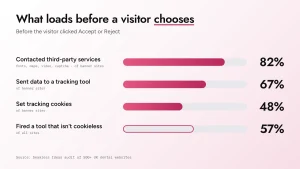
| Sent data to a tracking tool before the visitor chose anything | 67% of banner sites |
| Fired a tracking tool that isn’t cookieless before consent | 57% of sites |
| Set tracking cookies before consent | 48% of banner sites |
| Contacted third-party services (fonts, maps, video, captcha) before consent | 82% of banner sites |
| No consent banner detected | 42% of sites |
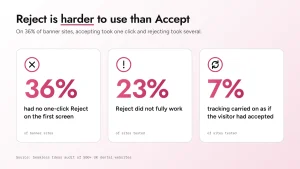
| No one-click Reject on the first screen | 36% of banner sites |
| Reject didn’t fully work | 23% of sites tested |
| Tracking carried on after Reject as if the visitor had accepted | 7% of sites tested |
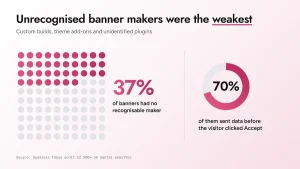
| Banners with no recognisable maker | 37% of banners |
| Send patients to a different website to book | 51% of sites |
| Still loading Universal Analytics, retired in 2023 | 16% of sites |
| Signs of server-side tracking | 4% of sites |
42% Of UK Dental Websites Showed No Cookie Consent Banner
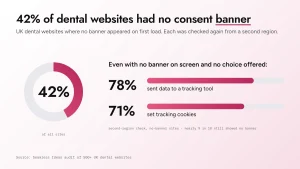
On 42% of the sites, a visitor landing on the page wasn’t shown a consent banner. That doesn’t prove a site never had one, since an unusual banner can be missed. It means none appeared.
We didn’t rely on one run. Every no-banner site was checked again from a different region, and nearly nine in ten still showed no banner when checked from multiple regions.
No banner didn’t mean no tracking. More than eight in ten of those sites were running at least one tracking tool. On the second check, 78% sent data to a tracking tool and 71% set tracking cookies, with no banner on screen and no choice offered.
67% Of Dental Websites With A Cookie Banner Still Tracked Visitors Before They Made A Choice
The purpose of a banner is to hold any tracking back until the visitor onsents to being tracked. On 67% of sites with a banner, it didn’t: at least one tracking tool sent data before the visitor clicked Accept or Reject.
Cookies told a slightly better story: 48% of banner sites set tracking cookies before consent. That is 19 points lower than the 67% that sent data before consent, so on banner sites, data leaving the page was more common than tracking cookies being set.
One more finding points the same way:
- Third-party services before consent. 82% of banner sites contacted outside services such as web fonts, maps, video players or captcha before the visitor chose. Each of these receives the visitor’s IP address.
37% Of Dental Cookie Banners Had No Recognisable Maker, And 70% Of Those Tracked Before Accept
The brand of banner wasn’t the deciding factor. The big names (CookieYes, Borlabs Cookie, Cookiebot, Complianz, OneTrust) all turned up, and all can block tracking. Whether they do depends on how they’re set up and wired into the site.
The weakest group was banners with no recognisable maker: custom builds, theme add-ons and unidentified plugins. They made up 37% of the banners we saw, and 70% of them sent data before the visitor clicked Accept.
36% Of Dental Cookie Banners Hide The Reject Button, And Reject Didn’t Fully Work On 23% Of Sites
On 36% of banner sites there was no one-click Reject on the first screen. Accepting took one click. Rejecting meant opening Manage preferences, scrolling through categories, unticking boxes and confirming. When rejecting takes more steps than accepting, visitors tend to click Accept. Placing a one-click Reject next to Accept on the first screen gives them an equal choice.
UK guidance is clear that rejecting should be as easy as accepting. A Reject option that only appears after opening settings is one of the banner designs that guidance addresses.
Finding the button is only the half of it, however. When we clicked Reject instead of Accept, Reject didn’t fully work on 23% of the sites tested. On 7%, tracking carried on as if the visitor had accepted.
Dental Websites Run 4 Tracking Tools On Average
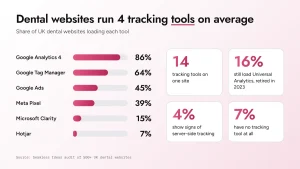
The average dental website we audited loaded 4 tracking tools, and one loaded 14. Many sites ran several tools that collect similar data, such as Microsoft Clarity and Hotjar, and each tool that loads is one more that a consent banner needs to control.
| Tool | Share of sites |
|---|---|
| Google Analytics 4 | 86% |
| Google Tag Manager | 64% |
| Google Ads | 45% |
| Meta Pixel | 39% |
| Microsoft Clarity | 15% |
| Hotjar | 7% |
The clutter showed up in three ways:
- Overlapping tools. GA4 often sat alongside Google Tag Manager, a standalone Google tag, Microsoft Clarity or Hotjar doing much the same job.
- Dead tags still loading. 16% of sites still loaded Universal Analytics, the old Google Analytics that stopped collecting data in 2023.
- Almost no server-side tracking. Only 4% showed signs of it, though it’s the setup that makes measurement sturdier and easier to control. Server-side tracking runs partly on the business/website’s own servers, so a check from the browser only sees signs of it. The real share may be higher than we observed.
At the other end, 7% of sites had no tracking tool at all.
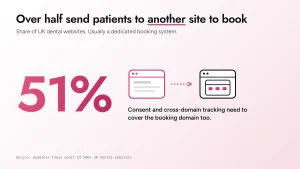
On booking, 51% of sites send patients to a different website to book, usually a dedicated booking system.
Why Dental Websites Track Visitors Before Consent
In our experience it’s rarely deliberate. It comes down to who set things up, and when:
- Tags hard-coded into the theme. A Meta Pixel or Google tag pasted into the site header years ago loads before any banner can stop it.
- Tag Manager not tied to consent. The banner records a choice, but the tags in Google Tag Manager were never set to wait for it.
- Consent defaulting to “yes”. Consent Mode is installed, but the starting state grants consent instead of denying it.
- Plugins doing their own thing. Chat widgets, review badges, embedded maps, fonts and booking widgets often bring their own tracking or third-party calls.
- Nobody re-tests. The site was checked on the day it went live, and everything added since hasn’t been.
How To Check And Fix Tracking And Consent On Your Dental Website
You can do a rough check of consent in five minutes:
- Open your site in a private browser window, so no earlier choice is remembered.
- Open the developer tools (F12) and go to the Network tab before you touch the banner.
- Reload the page and search the list for names like google-analytics, googletagmanager, facebook, clarity or hotjar. If any appear before you click, data is leaving before consent.
- Click Reject, browse to a second page, and look again. Anything still firing is ignoring the visitor’s choice.
- Check that Reject is on the first screen and as easy to find as Accept.
None of the fixes need a rebuild. In rough order of effort:
- Make the banner control the tags. Set every tag in Tag Manager to wait for consent, default Consent Mode to denied, and remove tags hard-coded into the theme.
- Put Reject on the first screen, next to Accept and just as prominent.
- Hold third-party services until consent. Host fonts locally, and load maps, video and similar embeds only after the visitor agrees.
- Cover the booking domain. If your booking system is on another domain, make sure consent and cross-domain tracking are set up there too.
- Clear out the dead weight. Remove retired tags like Universal Analytics and tools nobody looks at. Fewer tools mean fewer things to break and fewer consent problems.
If the checks turn up something you didn’t expect, ask whoever manages your site and tags to go through it with you. Alternatively, you can contact us at semlessideas.co.uk/contact-us.
What The Audit Doesn’t Show
Patient data. We saw nothing suggesting patient or health information was being sent. We didn’t submit any enquiry forms, so what happens when a patient fills one in is untested.
That a site has no banner at all. Only that our checker didn’t detect one, from multiple regions.
Anything beyond the first few pages, or what every visitor in every region sees.
Whether any of it breaks the law. What the data does show is where a site’s behaviour doesn’t match the choice its banner offers.
What Does Your Dental Website Send Before Consent?
We’ll run the same check on your site and show you exactly what loads before a visitor says yes or no.

Written by
Yousuf Kamran